For ITAD and e-recycling
Wipe 26 drives at once.
Pay nothing per wipe.
Atola TaskForce 2 erases SATA, SAS, NVMe and USB drives in parallel at up to 100 TB per hour.*
You pay once for the system, then diagnose and wipe as many drives as come through your door.
Tell us your monthly drive volume and we'll send a quote.

* Measured with Wipe with pattern on 26 fast SATA, SAS, USB and NVMe drives running in parallel.
Per-drive erasure licenses cost more every time your volume grows
Most erasure software is sold per drive, per seat or in volume tiers. A good intake month brings a bigger license bill, and that cost lands on every lot before a single drive is resold.
TaskForce 2 is priced as a system. You pay once, and diagnostics and wiping are unlimited for the life of the platform. Your 10,000th drive costs the same in licenses as your first one, which is nothing.
The more drives you wipe, the less each one costs
| Per-drive erasure licenses | Atola TaskForce 2 | |
|---|---|---|
| How you pay | For every drive erased, often with seat or volume tiers | Once, for the system |
| Your next 1,000 drives | 1,000 more licenses | $0 |
| Wiping hardware | Bought separately | Included, 26 ports |
| Write protection | Depends on your hardware | Physical switch on every port |
Wiping and diagnostics keep working after your software subscription ends. The subscription adds software updates, a lifetime hardware warranty, training and support.
Wipe 26 drives in parallel at up to 100 TB per hour
TaskForce 2 has 26 ports: 8 SATA, 8 SAS/SATA, 4 NVMe (M.2/U.2, PCIe 4.0), 4 USB and 1 IDE. Fill them all, and Wipe with pattern runs on every drive at once, reaching up to 100 TB per hour on fast drives.
Connect the drives, press Select all, choose the method and start. Diagnostics, wiping and hashing all launch across many drives with one click.
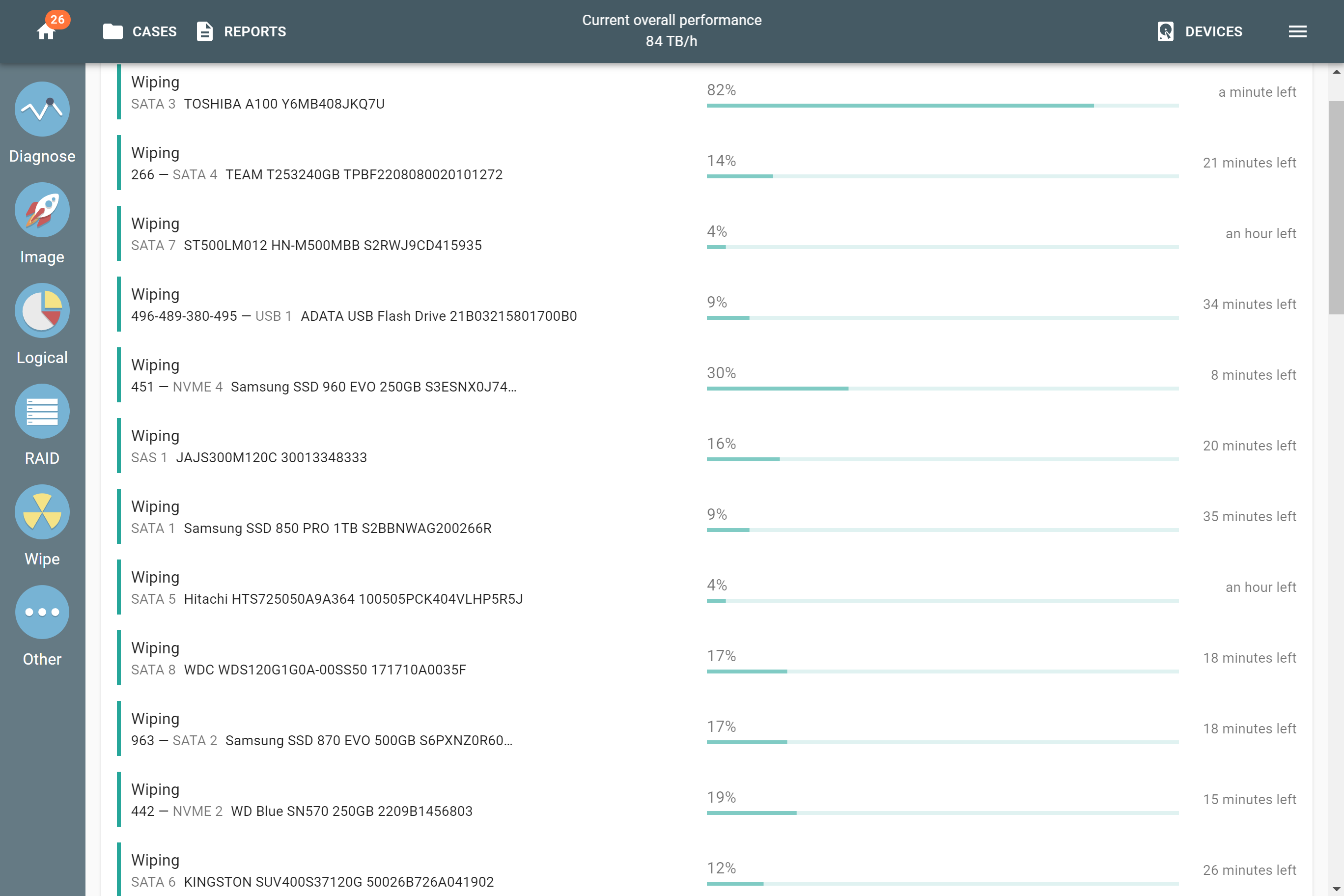
Max parallel wipings per drive type
4 native + 4 via USB-NVMe adapters
Each number is the maximum for one drive type. SAS and SATA drives share the 8 SAS/SATA ports, and USB-NVMe adapters use the USB ports.
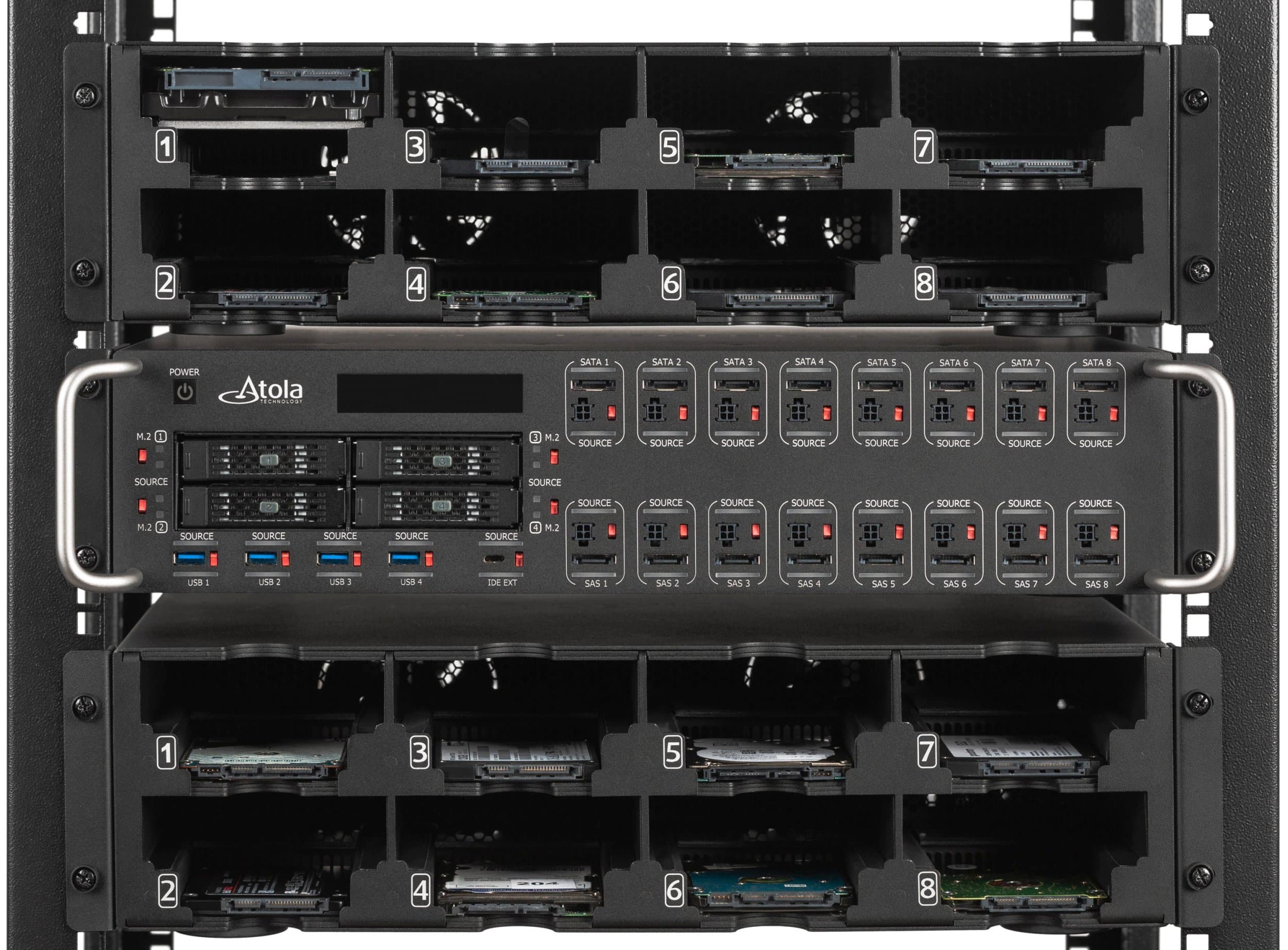
Mount your wiping station in a server rack
TaskForce 2 fits a standard server rack, along with one or two Atola Device Racks that hold the drives while they're wiped.

Find dead drives in 5 minutes, before they eat your wipe time
A quick health check flags failing drives before erasure starts. Send them straight to physical destruction and keep wipe time for drives you can resell.
Catch drives with reset SMART data
Diagnostics reads the Seagate FARM log and compares it with SMART power-on hours, model, serial number and capacity. When the numbers disagree, TaskForce 2 flags the drive. That catches used Seagate drives whose SMART data was reset to make them look new, so you grade and price them correctly before resale.

Use the erasure method your client's contract asks for
TaskForce 2 supports:
- IEEE 2883-2022
- NIST SP 800-88 Rev. 2
- DoD 5220.22-M
- ATA Secure Erase
- NVMe Sanitize
- SCSI Sanitize for SAS SSDs (new in 2026.10)
- Random and custom pattern overwrite
Prove every sector was overwritten
The Compare module checks a wiped drive sector by sector against your wiping pattern and lists any sector that differs or can't be read. Run it across many drives at once in Multi-launch mode.
Certificates with your logo, filled in automatically
Upload your own HTML certificate template once. TaskForce 2 fills in the drive details, result and date for every wipe, and you hand your client a certificate under your brand.
Enter case details (client name, lot or job number) before a multi-drive job starts, and every drive in the session is filed under that case. Each operation gets a full report and log without anyone typing it up. Search reports later or export logs to CSV.
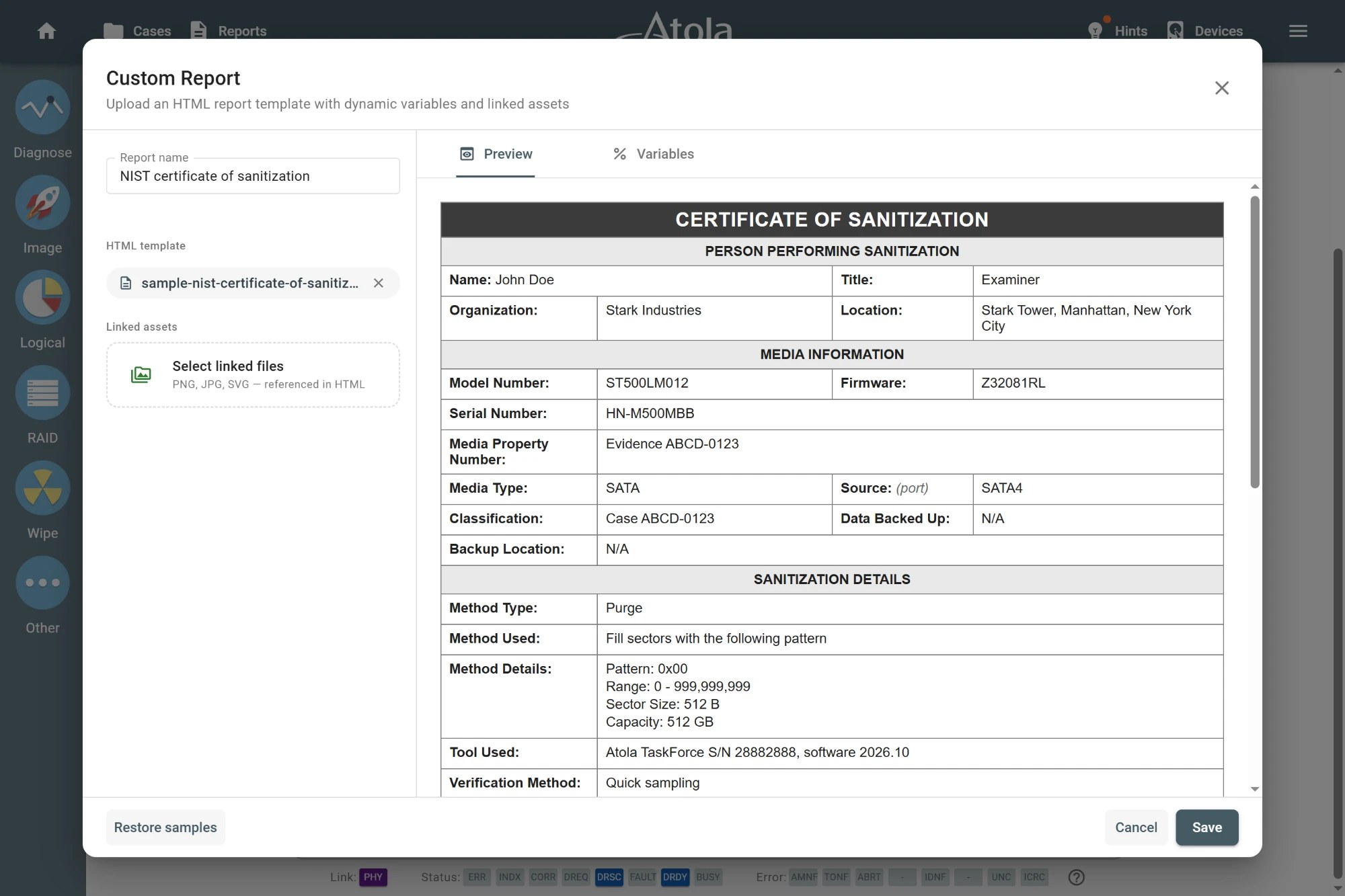
A physical switch on every port stops accidental wipes
Every port has a dedicated hardware write-protection switch. Flip it on for a drive under legal hold, a drive waiting for client sign-off or anything you only need to read and hash. An LED next to the port shows protection is active.
It's the same write-blocking hardware forensic labs rely on when they image evidence.
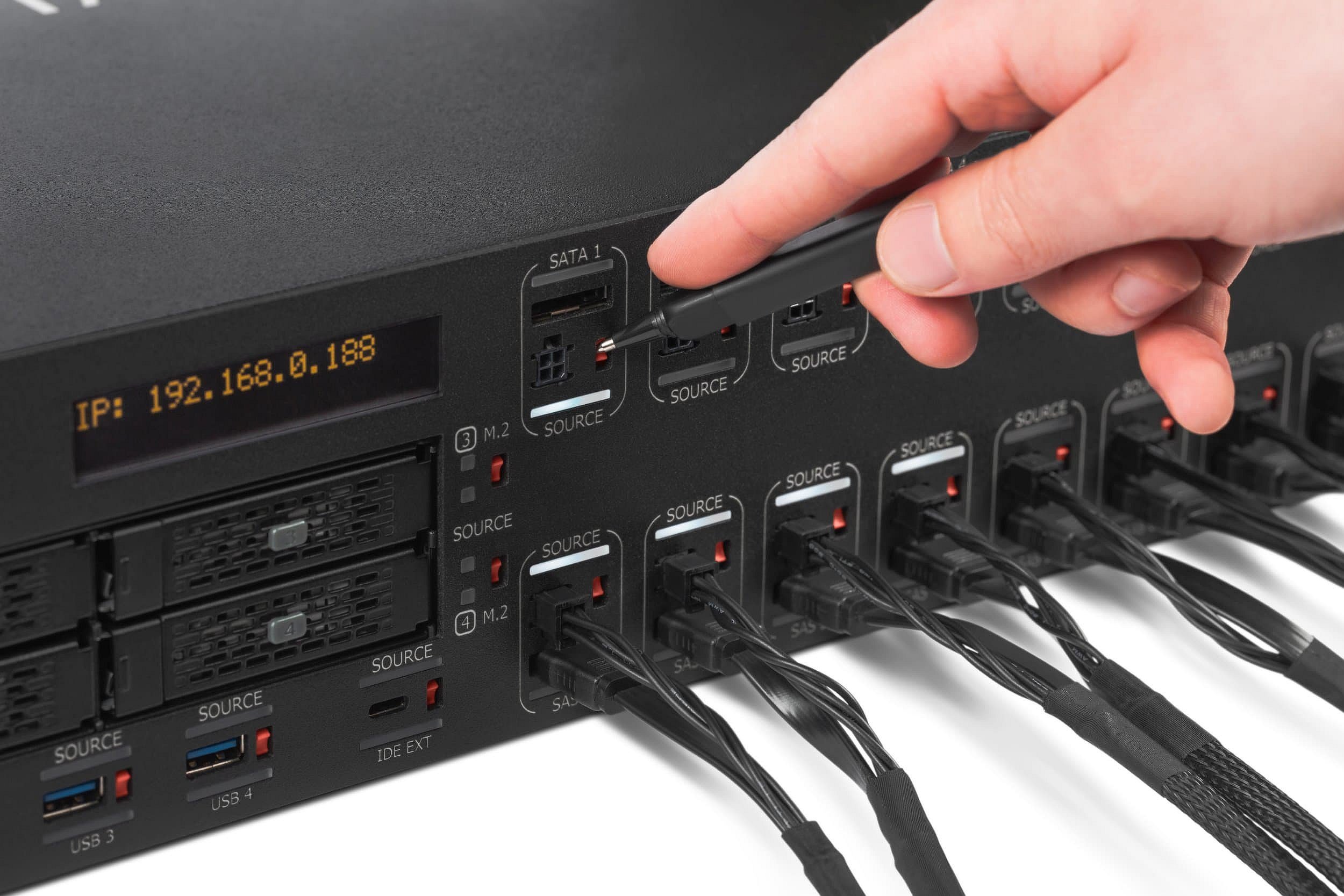
From intake to certificate in four steps
- Log the lot. Connect the drives and enter the case details: client, lot ID, operator.
- Check health. Run the 5-minute health check on all drives at once and pull the failures for shredding.
- Wipe and verify. Pick the method, press Select all, start. Run Compare afterward if the contract asks for verification.
- Issue certificates. Print or export a branded certificate and full log for every drive.
Built by the team behind Atola Disk Recycler
Atola has made drive hardware since 2003. Disk Recycler was our first wiper for e-recyclers, sold for a one-time fee with no per-use charges. TaskForce 2 keeps that pricing model and adds NVMe and USB ports, current erasure standards, branded certificates and a Web API for diagnostics, cases and reports.
Still running Disk Recycler? Ask about moving to TaskForce 2 →
FAQ
Do I pay per drive or per wipe?
Neither. You pay once for the system, then diagnose and wipe as many drives as you need for the life of the platform.
Do I need an active subscription to keep wiping?
No. Wiping and diagnostics keep working without it. The subscription covers software updates, a lifetime hardware warranty with free replacement of units, modules and cables, training and technical support.
Which drives can TaskForce 2 wipe?
SATA, SAS (up to 12 Gb), NVMe M.2 and U.2, USB and IDE drives. Flash cards work through a USB card reader. An extension slot adds Apple PCIe SSD or Thunderbolt support.
How many drives can I wipe at once?
Up to 26, one per port.
Can TaskForce 2 erase SSDs?
Yes. Use NVMe Sanitize for NVMe drives, SCSI Sanitize for SAS SSDs and ATA Secure Erase for SATA SSDs, or overwrite them with a pattern.
Which erasure standard should I use?
Use the one your client's contract names. Most current contracts ask for NIST SP 800-88 or IEEE 2883. TaskForce 2 also supports DoD 5220.22-M for older contracts.
Can I put my company's logo on wipe certificates?
Yes. Upload an HTML template with your branding. TaskForce 2 fills in the drive and job data for each certificate.
What happens to drives that fail the health check?
They're flagged in the report before wiping starts, so you can route them to physical destruction and record why.
Is TaskForce 2 certified under NAID AAA, R2 or ADISA?
No. TaskForce 2 does not hold ADISA product certification. NAID AAA and R2 certify your facility and process rather than a tool, and auditors ask for a record of every erasure. TaskForce 2 keeps a report and log for each drive, and the Compare module lets you verify the wipe pattern sector by sector.
Can TaskForce 2 wipe drives still inside laptops or servers?
No. TaskForce 2 wipes drives connected to its ports. If you erase whole machines without pulling the drives, boot-based erasure software is the better fit for that part of your intake.
Can TaskForce 2 connect to our ERP or asset tracking system?
Partly. The Web API can create cases, run diagnostics, run Compare and pull reports, so drive results can flow into your own software. Wiping itself is started from the TaskForce 2 interface.
We already pay for erasure software. Do we have to replace it?
No. TaskForce 2 is a standalone unit with its own ports and software. You can move high-volume bench wiping to it and keep your current tool for the rest until its licenses run out.
Where can I buy it?
From Atola directly or from a local distributor. Call +1 888 540 2010 or +1 416 833 3501 (10 AM to 6 PM ET), or request a quote on this page.