Whoa, look what we’ve got! The TaskForce 2025.4 firmware update is here, and it’s packed with useful new features! Whether you’re dealing with remote drives, analyzing sector data or rebuilding tricky RAIDs, this update has something for you.
Here’s our top picks:
- iSCSI support for imaging remote drives
- New built-in HEX Viewer
- Smarter RAID autodetection with support for missing Synology NAS drives
Let’s take a closer look at these and other new capabilities introduced in this update.
Image remote drives via iSCSI
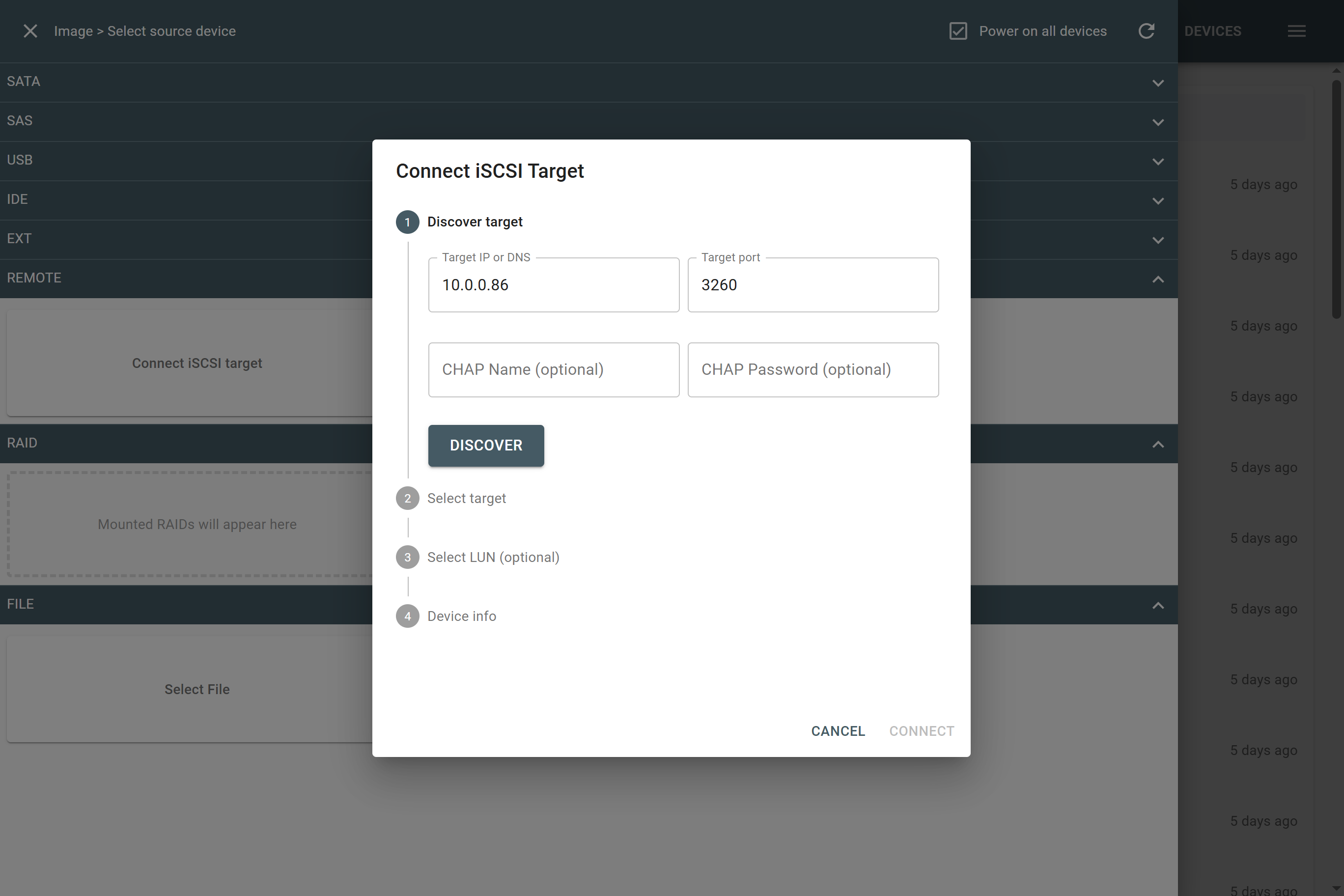
TaskForce now supports imaging remote drives connected via iSCSI.
This is especially useful when:
- A drive is soldered to the motherboard (as in many ultrabooks or embedded systems)
- The drive cannot be physically removed from a computer due to legal, logistical, or technical constraints
With iSCSI, the remote system exposes its drive as a network-attached block device, which TaskForce detects and can image like any locally connected storage.
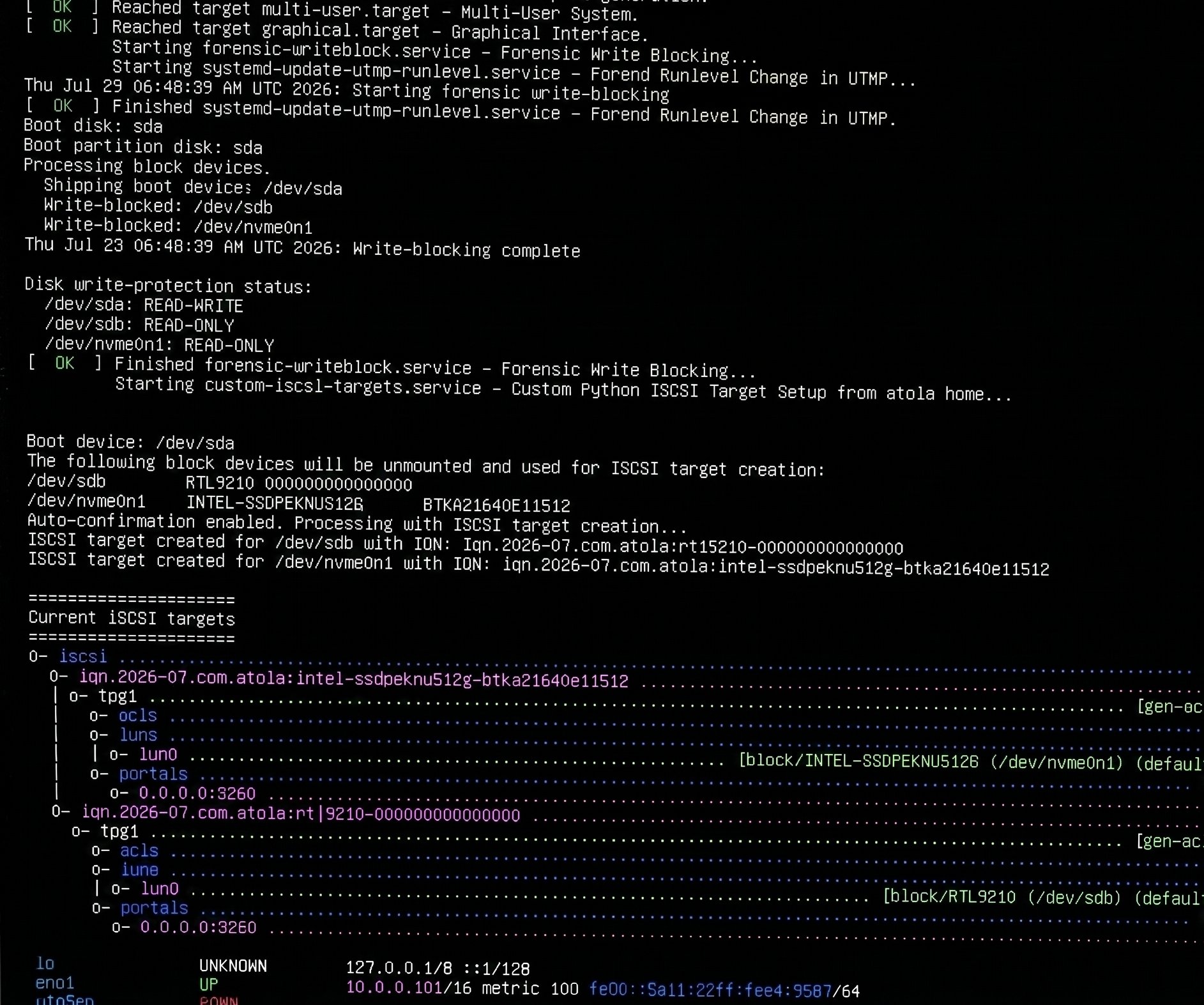
To help you quickly set up remote drives on Linux as iSCSI targets, we have a free, ready-to-use script for you.Â
Dive deeper into the data with Hex Viewer
For your convenience, TaskForce now includes a built-in Hex Viewer.Â
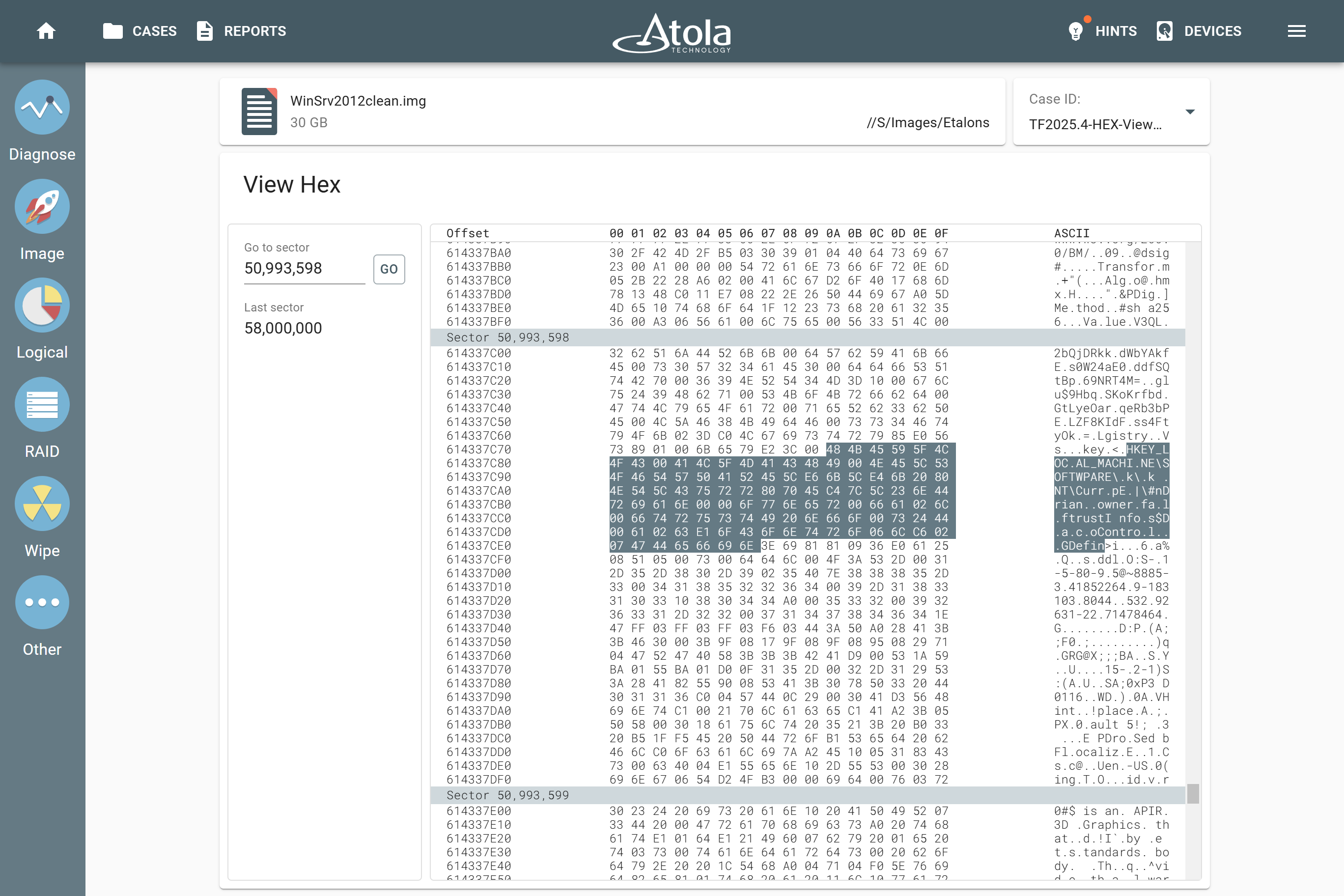
This feature is invaluable for identifying unusual data patterns or analyzing file structure in depth.
To check the device contents on a sector level while imaging, click the View Hex button and then:Â
- Just scroll up or down through the bytes seamlessly or
- Jump to a certain location using Go to Sector feature
And if you’re performing logical acquisition or browsing files, Hex Viewer lets you see all the bytes of a file or examine its specific portion using the Go to offset command.Â
Benefit from RAID module improvements
The TaskForce 2025.5 update brings numerous improvements to the RAID module, designed to increase reliability and flexibility, especially in complex configurations.
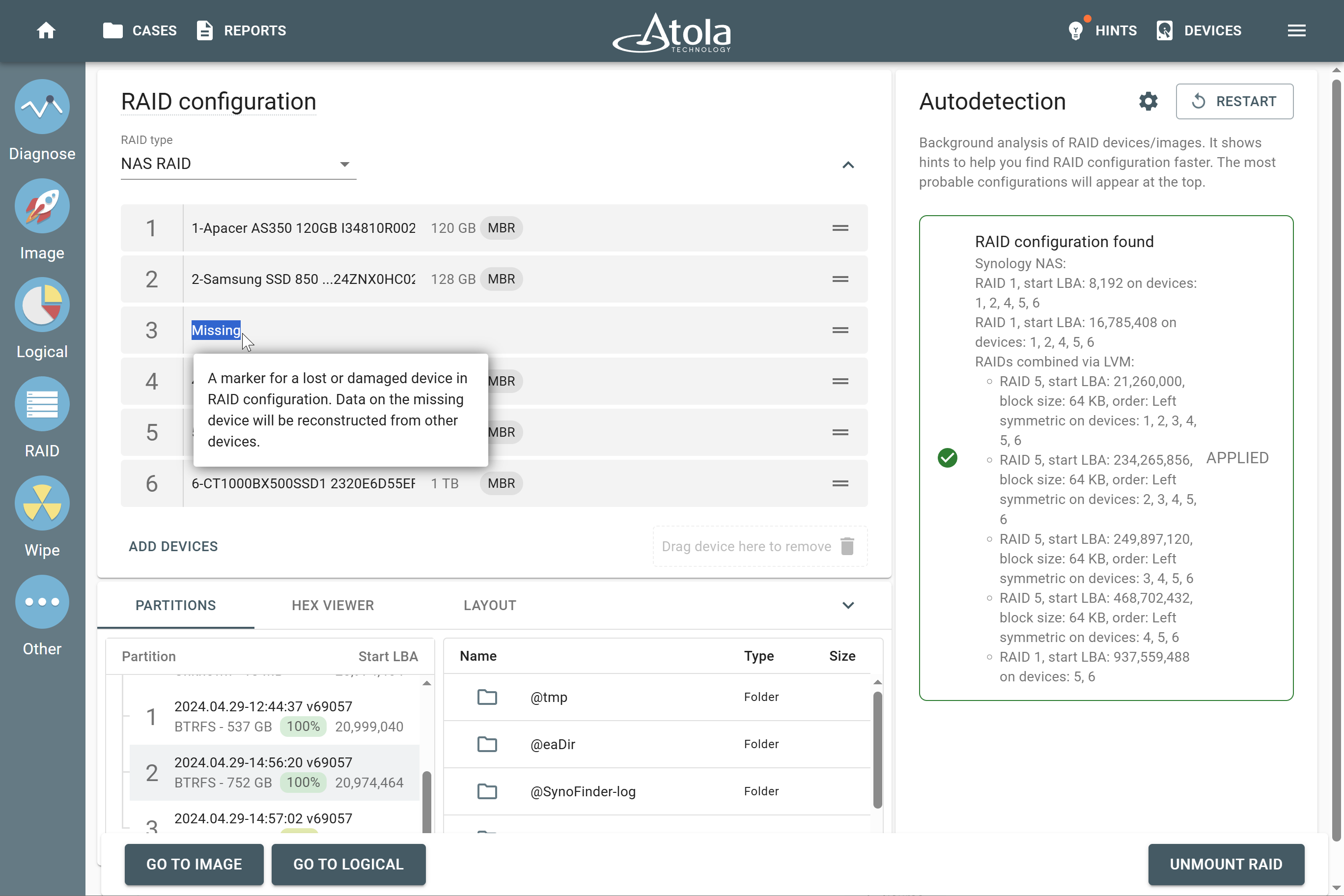
Support for Synology NAS RAIDs with a missing device
Now TaskForce automatically detects if a member of Synology NAS RAID is missing and rebuilds an array anyway using parity information from other devices included in the RAID.Â
Pause/Resume, cheat sheet and other RAID enhancements
This update is also packed with other RAID-related features and tweaks:
- Pause/Resume during RAID autodetection when finding out a tricky array configuration takes too long
- New RAID cheat sheet displayed when autodetection fails — helping you recover configurations manually
- Max RAID members increased from 16 to 64 — to handle large, enterprise-grade arrays
- Smarter auto-reassembly when the Master Boot Record is offset
- Reduced memory usage during intensive RAID operations
These enhancements ensure faster, more accurate detection, and more robust handling of edge cases — even when not all drives are available.
To learn more about the rest of the features and bug fixes, scroll down to the TaskForce 2025.4 Changelog below.
Download TaskForce 2025.4 firwmare
To get access to all new features, download updates from our website:
- for Atola TaskForce
- for Atola TaskForce 2
Where to buy
To order Atola TaskForce or TaskForce 2 hardware unit or extend your subscription, contact Atola Technology directly or find a distributor near you.
Having an active subscription, you can use the latest firmware, request a free replacement of a device, extension module, or cable, as well as free training and technical support.
To get more information about Atola TaskForce or to discuss the details, please contact Atola Technology sales department:
- Call us: +1 888 540 2010, +1 416 833 3501 10AM-6PM ET
- Or email us
TaskForce 2025.4 Changelog
New Features
Imaging
- Imaging of remote drives via iSCSI
- New variables in target file templates:Â
- {EVIDENCE_ID} – Inserts the evidence identifier
- {NUM+} – Number of increment if a file or folder exists
- 2x increase in NVMe-to-NVMe imaging speed
- New global setting ‘Edit case details upon imaging completion’, which automatically updates target file name, folder path and metadata when they depend on a file template
RAID enhancements
- Added Pause/Resume for autodetectionÂ
- Support for Synology NAS RAID with missing devices
- Improved auto-reassembly when finding MBR is offset
- Reduced memory usage during RAID operations
- RAID cheat sheet shown when autodetection fails to find a configuration
- Maximum number of RAID members increased from 16 to 64
Logical imaging
- Support for NTFS alternate data streams
- Implemented handling of NTFS soft linksÂ
- Tooltips added for various file and folder icons
Diagnostics
- Improved representation of specialized partitions (e.g., Microsoft Reserved, macOS Boot)
Hex Viewer
- For drives and image files
- For files in Logical imaging and Browse files
Wiping
- New “Format to exFAT after wiping” option
Case management
- Added new device fields: Evidence ID and Evidence Examiner
- Notes can now be added to any report log (via green plus icon)
- Case Investigator field renamed to Case Examiner.
Network and connectivity
- Full IPv6 support
- Network connection dialog: defaults to guest access when no username is provided.
TaskForce 1 only
- Operation LED now indicates an active running task instead of device activity.
Bugfixes
Imaging
- Resolved slow NVMe drive imaging when ‘Read SMART before imaging’ option is enabled (disabled by default)
- Fixed an issue where Express mode could be activated without selecting a target share folder
Diagnose
- TaskForce 2 only. Fixed false head check failure for SATA drives connected to SAS ports
- Resolved false head check failure for certain IDE drive models
Case management
- Fixed incorrect sorting by Device column in Cases and ReportsÂ
- Ensured that Missing Examiner, Organization, and Location fields appear in RAID device reports when specified in the TaskForce global settings
Other fixes and corrections
- Resolved a rare issue that required a reboot after extended continuous operation (two or more weeks)
- Fixed failure to format specific WD USB drives to TaskForce Storage mode
- Corrected 0B capacity display for NVMe drives connected via Orico USB-NVMe adapters
- TaskForce 2 only. Fixed hidden failure to initiate 802.3ad mode during Ethernet bonding activation

- TaskForce 2026.10 update: Compare module and Seagate FARM log - October 15, 2026
- Image only files with artifacts in Insight Forensic 5.8 - June 18, 2026
- 25G Fiber extension + TaskForce 2026.2 update - March 26, 2026

Sergiy Pasyuta
Sergiy is an experienced technical writer with a passion for simplifying complex concepts in user manuals. With a keen eye for detail and a knack for clear communication, he crafts articles that guide users through our products’ functionalities.