The new firmware update for TaskForce is ready for download! It features the Compare module to spot the slightest sector differences, enables the detection of the used-drive scam on Seagate devices, and introduces additional features for ITAD/eRecycling customers.
Find sectors that differ
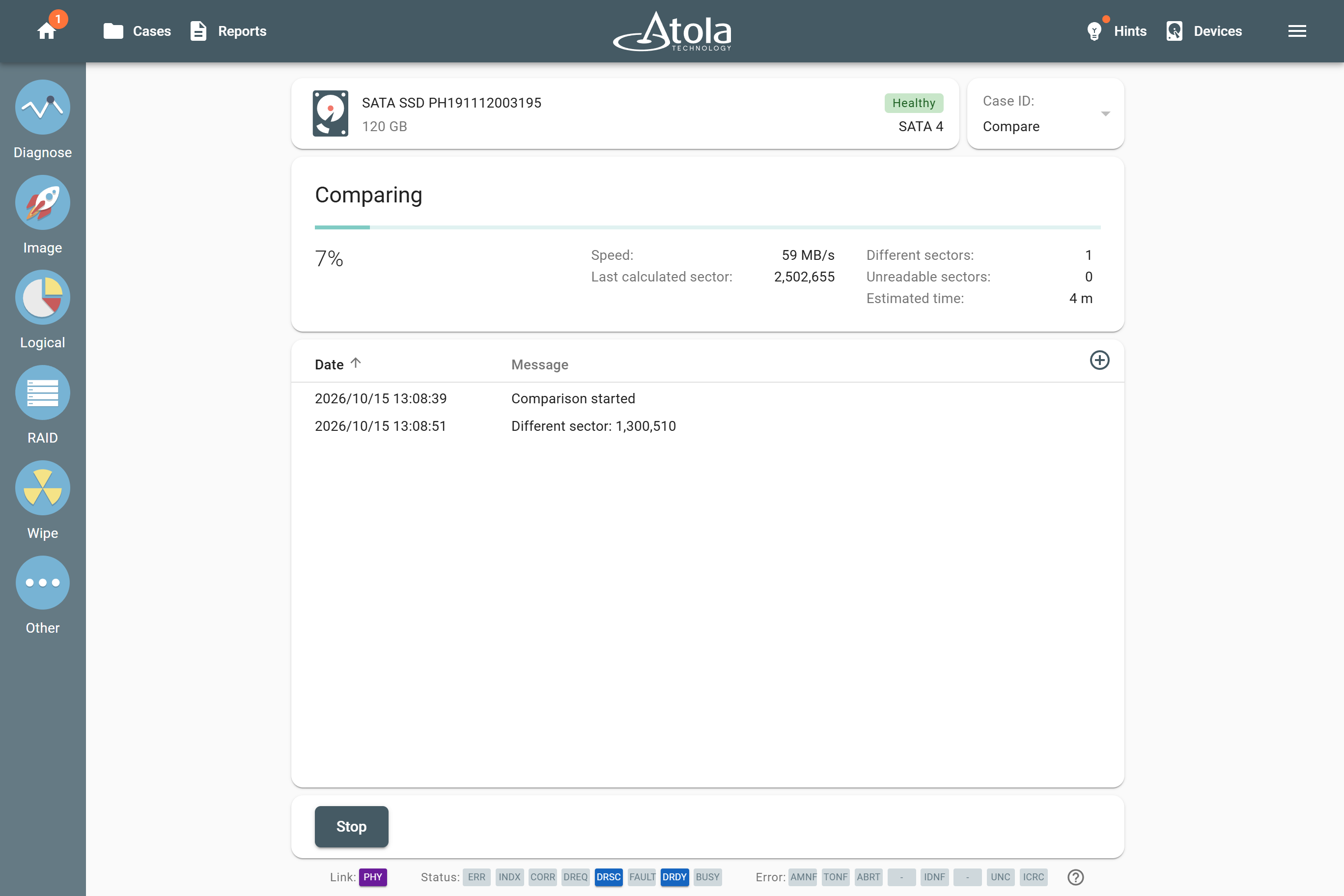
The new Compare module, hiding under the Other icon, basically helps you find a needle in a haystack. It searches all sectors of a source drive and its image (drive or file) and reports exactly which sectors differ or are unreadable. You can also compare disk sectors with a specified Hex or LBA pattern.
It may be handy when the hash doesn’t match or when you need to make sure that absolutely all drive sectors contain your wiping byte pattern.
The comparison can be also launched via API using the new /compare endpoint.
Detect used Seagate drives pretending to be new
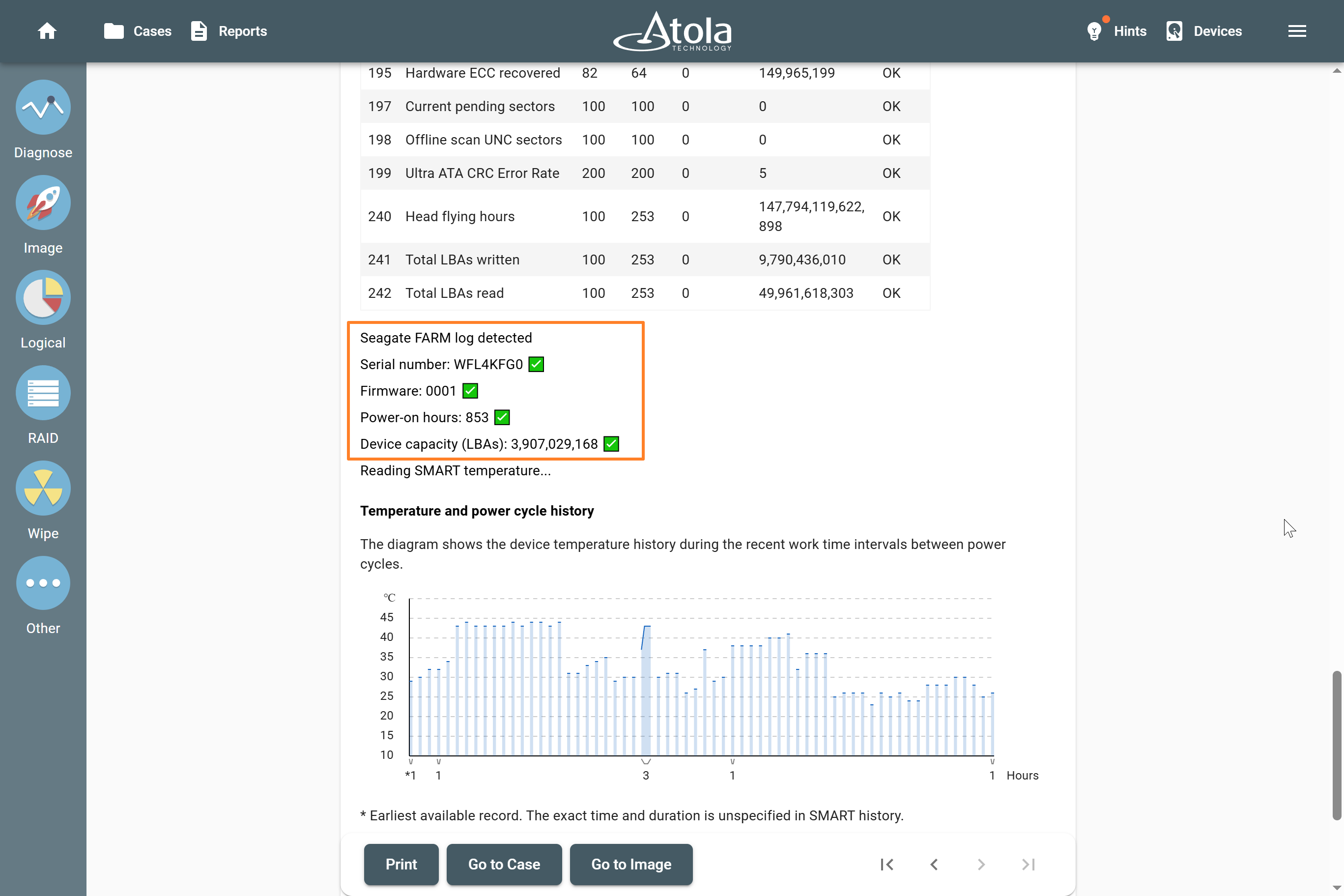
There’s a known scam case where used Seagate drives were illicitly repurposed to appear new. The SMART values used hard drives had been reset to facilitate their sale.
TaskForce can now detect such counterfeit devices. The Diagnostics module reads the Seagate Field Access Reliability Metrics (FARM) log and flags drives whose SMART power-on hours, model, serial, or capacity don’t match the FARM log.
Features for IT asset disposition / eRecycling
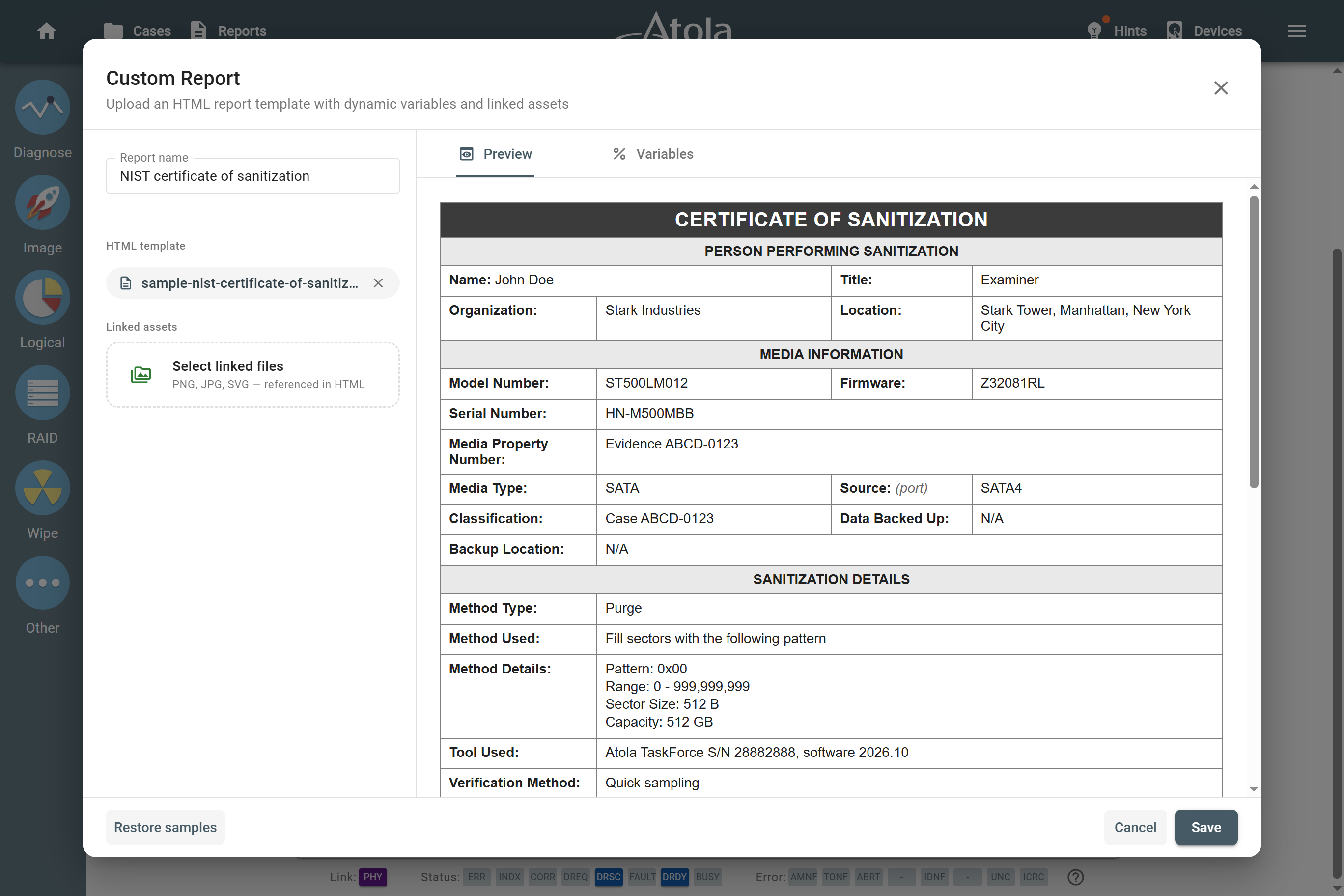
For our clients from ITAD / eRecycling businesses, the new firmware introduces several useful options:
- Enter case details before starting a multi-drive diagnostics or wiping process.
- Select all connected drives with a single button on the Device panel.
- Create custom drive wiping reports using HTML-templates with reusable variables.
Download TaskForce 2026.10 update
To get access to all new features, download updates from our website:
- for Atola TaskForce
- for Atola TaskForce 2
Where to buy
To order the TaskForce or TaskForce 2 hardware unit or to extend your subscription, contact Atola Technology directly or find a distributor near you.
To get more information about Atola TaskForce or to discuss the details, please contact Atola Technology sales department:
- Call us: +1 888 540 2010, +1 416 833 3501 10AM-6PM ET
Or email us
TaskForce 2026.10 Changelog
New features
Compare – a new task in the Other section. Sector-by-sector comparison of any drive or image file:
- Compare against a HEX pattern, an LBA pattern, or 1-to-1 with another drive or image file
- Unreadable and Different sectors are counted and listed in the log
- Multi-launch mode supports comparison with patterns
- New Web API endpoint /compare
Wiping:
- Custom report templates. Import your own HTML report template with dynamic variables (date, result, drive info, etc.) into the Work Folder, preview it, and select it when starting a wipe – designed for ITAD and eRecycling workflows.Â
- Added the Select all button for Multi-launch Wiping workflows.
- Set case details before task start is now supported for Multi-launch Wiping and Diagnostics.
- All devices selected in a Multi-launch session can be assigned to the same case before the task starts.
- TaskForce 2 only: new SCSI Sanitize method for SAS SSDs.Â
Diagnostics: Detection of Seagate drives with tampered SMART or identification data (used-drive scam). Firmware check now reads the Seagate FARM log and cross-checks it against power-on hours, model, serial number and capacity.
E01 compatibility: Improved support for E01 files created by third-party forensic tools and imagers, including EnCase, FTK, X-Ways, and Tableau.
Imaging:
- Added CASE_EXAMINER and EVIDENCE_EXAMINER patterns to imaging target file templates.
- A hidden Imaging completed (post-hash yet to start) report is now always saved to the Work Folder when post-hash is enabled. New global setting makes these reports visible in lists and search.Â
- Typing YES is now required before imaging to a target drive with an MBR and no partitions (same as for GPT).Â
- Imaging progress visualization for damaged drives now limits frequent red flashing when large numbers of bad sectors are encountered.
- Distinct head graph colors for drives with more than 18 heads.Â
File systems:
- Imaging, Logical Imaging, Browse Files, and HEX Viewer can now work with partitions that extend beyond the reported size of a device. This helps recover available data from incomplete images and partially acquired drives.Â
- RAID autodetection still excludes them from configuration validation.Â
Logical Imaging and Browse Files:
- Logical Imaging reports with read errors are now highlighted in yellow to make incomplete acquisitions easier to identify.
- Read error counts are included in Logical Imaging, Check, and List Files results.
RAID:
- Added a three-dot menu for assembled RAID devices with Add case and Unmount RAID actions.
- Assembled RAID devices can now be added to a case from the Cases page and via the global Add case workflow.
Reports and logs: Optimized handling of very large logs (10,000+ records) – virtualized log view in progress pages and reports. When printing more than 3,000 log records, logs are offered as a ZIP of CSV files; printing is limited to 100 reports at a time.Â
Network and connectivity:
- Hidden network shares (names ending with $) can now be pinned via the new Pin Share context menu.
- New network setting Discover network hosts using ICMP (enabled by default). Disable it to stop TaskForce from pinging hosts on the network.
- A target folder can no longer be selected inside the remote Work Folder (UI, Web API, Express mode, templates).
- Improved help for the Connect to shared folder dialog with a link to the manual.
Web API:
- New /compare endpoint.
- /check-task response now includes only the fields relevant to the task and a new errors field.
- api/help documentation extended with expected /check-task responses for each task type.
User interface:
- Refreshed UI controls across the whole application
- Improved Storage drive formatting dialog: exFAT/VeraCrypt selection moved to a separate step, “What is Storage?” link, previous choice is remembered.
- A notice recommends a minimum screen resolution of 1366×890 (landscape) or 910×1366 (portrait).
System: A critical warning is shown when a hardware component (SATA/USB/SAS/IDE controller, etc.) fails to initialize during boot, with recommended recovery steps.Â
Bugfixes
Imaging:
- Segmented E01 imaging could stop with an “All memory Buffers are allocated†error in specific imaging configurations.
- Incorrect E01/AFF4 metadata could be used when switching between imaging templates.
- RAW/DD/IMG target file size could be shown as 0 B in the final report when post-hash verification was disabled.
- Improved performance and memory consumption when displaying and printing very large task logs.
Diagnostics: Heads check could fail with a BufferOverflow error on Seagate drives with a 4K logical sector size.
Logical imaging and Browse files:
- List Files could fail when a source image name contained a comma or when saving a CSV file to a network folder.
- AM/PM information was missing from timestamps exported by List Files.
- IndexOutOfBoundsException when reading the Btrfs bitmap.
- Set case details before task start was not applied to Browse files.
Wiping: The number of processed sectors in a stopped Wiping report could be smaller than the number of sectors actually erased.
Network:
- Gateway and DNS settings were not applied when Bonding was enabled.
- File browser could stop responding after repeated requests to unavailable servers.
- TaskForce could crash when certain CIFS mountOptions were specified.
Storage:Â
- VeraCrypt Storage was not automatically recognized again after a power cycle or reconnection.
- TaskForce 2 only: formatting an NVMe drive to VeraCrypt storage hung (since 2026.2).Â
Case management:
- Reversed order of RAID members in the header of case import/export reports.
- Case created and Device added reports were overwritten when Auto Fill Empty Case Details was used with a RAID.
Global settings:
- TaskForce 2 only: Slider values (LED brightness, fans) could be skipped when moved quickly.
Empty manual page at Settings > User management > Learn more.Â

- TaskForce 2026.10 update: Compare module and Seagate FARM log - October 15, 2026
- Image only files with artifacts in Insight Forensic 5.8 - June 18, 2026
- 25G Fiber extension + TaskForce 2026.2 update - March 26, 2026

Sergiy Pasyuta
Sergiy is an experienced technical writer with a passion for simplifying complex concepts in user manuals. With a keen eye for detail and a knack for clear communication, he crafts articles that guide users through our products’ functionalities.