Sometimes the drive you need to image is a drive you can’t take out. The SSD is soldered to the motherboard. Or server that forbidden to disassemble. Here is how our customers talk about such kind of cases.
Tax authority:
During a physical search in the home of a suspect or a datacenter, connect the atola to the router /switch on the network and plug in multiple usb sticks in computers on location to start imaging, or do perhaps even remote triage?
Law enforcement:
It would saves a lot of time if TaskForce was very far from the source drive location and allow to image a remotely located drive
Army:
The imaging of a suspect computer through the network port is completed by booting the machine with a bootable USB drive (created with a utility provided by the maker of the imager). This comes in handy for laptops or tablets that are difficult or time consuming to disassemble in the field for imaging.
Meet Atola Boot Image
Atola Boot Image is a free bootable Linux image designed by Atola Technology for effective remote forensic drive acquisition.
You write it to a USB stick and then boot the target machine from it whether it’s a laptop or a server. The machine exposes all its drives via iSCSI, so you can acquire them over the network.
It works with all Atola imagers:
- Atola TaskForce 2
- Atola TaskForce,
- Insight Forensic
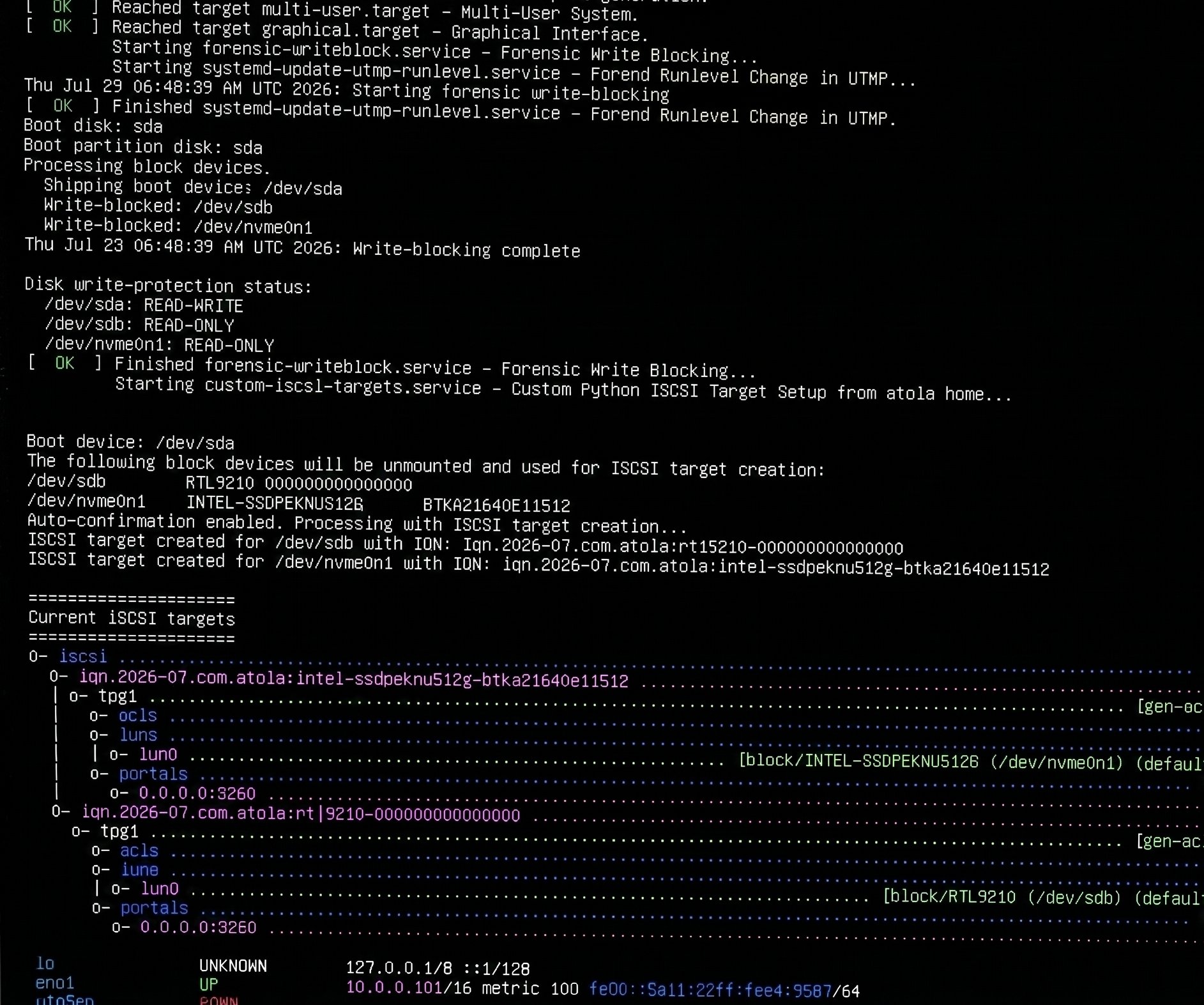
Three things happen automatically
The moment your target PC boots from the USB stick:
- Every internal drive becomes write-protected.
- The drives are exposed on the network as iSCSI targets.
- The PC waits for getting an IP address from a routers and shows IP address on screen.
No prompts, no configuration, no Linux knowledge required at the target machine.
Enter the IP address into your Atola Imager to discover the iSCSI drives.
Select a drive and then image or triage it first. The model and serial numbers of the drives will be propagated automatically.
See how you can do this:
- TaskForce 2 / TaskForce: Image a remote iSCSI drive
- Insight Forensic: Image a remote drive via iSCSI
For more information, feel free to read the user guide.
Download Atola Boot Image
The boot image is available for download at this page: Download Atola Boot Image
Tip: You can also use this boot image with your other imagers that can take advantage of iSCSI drive access.
Where to buy an Atola imager
To order Atola Insight Forensic or Atola TaskForce 1/2 system , contact Atola Technology directly or find a distributor near you.
To get more information about Atola Insight Forensic or to discuss the details, please contact Atola Technology sales department:
- Call us: +1 888 540 2010, +1 416 833 3501 10AM-6PM ET
- Or email us

He believes in saving time & energy of people doing mission-critical work. Therefore, all his efforts are focused on leading R&D of innovative Atola products.
Gamification enthusiast. Agile development proponent.
- Remote drive acquisition using Atola Boot Image - July 27, 2026
- New hardware engineer has strengthened the Atola team - June 8, 2026
- Two new QA engineers have joined Atola - May 4, 2026

Vitaliy Mokosiy
Atola CTO He believes in saving time & energy of people doing mission-critical work. Therefore, all his efforts are focused on leading R&D of innovative Atola products. Gamification enthusiast. Agile development proponent.