Atola Insight Forensic

Q&A during Techno Security and Digital Forensics Conference in San Antonio

We have just returned from Techno Security & Digital Forensics Conference, which took place on September 18-20 in San Antonio, Texas. Here are some of the questions asked at this event, which we would like to share with you, along with our answers to them. Should you have further queries, please don’t hesitate to write a comment below or send us a message here. Question: Is there a reason why segmented hashing should be used to calculate hash of drives that are not damaged? Answer: Yes, segmented hash allows you to verify evidence on the drive and its image even if either of them becomes damaged at some point in Read more…

Atola Insight Forensic

Thunderbolt extensions ready for shipping!

We are pleased to inform you that we have a bunch of Thunderbolt extension modules in stock that are ready to be shipped. The first extension modules are already on their way to the early birds who have placed their orders before they became available. Thunderbolt extension module enables forensically sound imaging and other operations on all generations of MacBooks. Supported interfaces and functionality Thunderbolt extension enables Insight to work on all MacBooks with the following interfaces: FireWire Thunderbolt 2 Thunderbolt 3 (2016 – 2017 models) With the help of Thunderbolt extension module you can perform such operations: imaging hash calculation hash verification comparing media scan file recovery 2016 and 2017 generations Read more…

Atola Insight Forensic

Exporting and importing cases from one computer to another

It is possible to transfer all or some of the cases stored in one Insight’s case management system to another one. The only requirement is that both computers have the same version of Insight installed. Whenever cases need to be transferred from one computer to another one, start by exporting the cases. 1. Go to Cases category of the top level menu and click Export. 2. In the Export Cases window select folder where the cases should be stored, then select the cases you would like to be exported and click Save button.3. The cases are now saved as a package in a zip file (with the default name Cases.Package.zip), which Read more…

Atola Insight Forensic

Splitting an imaging session to separate targets

A situation may occur when multi-target imaging is paused to be continued later, but one or more targets become unavailable. The drive may need to be taken and used by another technician or broken, or the server with the image file may become unavailable. But you may need to finish the imaging to the remaining target asap to start working on the evidence. It is for such cases that we have added the splitting imaging sessions functionality to the 4.9 release of Atola Insight Forensic. With the source drive connected to Insight, go to Imaging category and view the details of the interrupted imaging session to several targets. If not Read more…

Atola Insight Forensic

Multi-pass imaging: how to image damage drives?

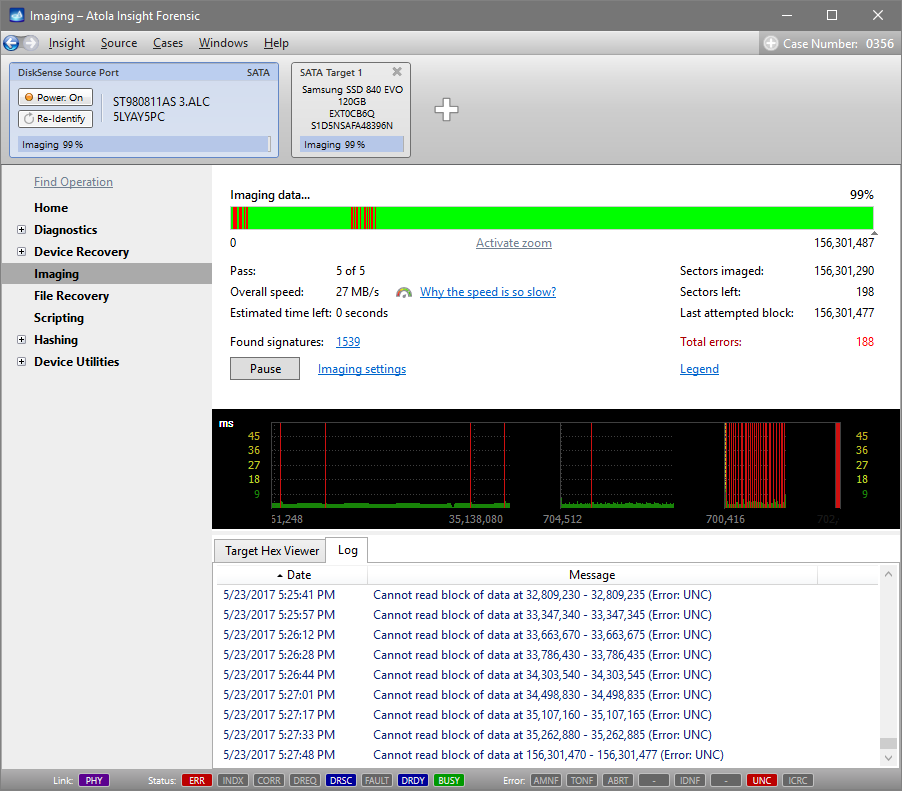
Atola Insight Forensic has a complex imaging functionality, which allows imaging even physically damaged hard drives, while avoiding further drive deterioration. Damaged drives require a complex imaging approach, which would balance thorough data extraction with forensics’ need in expediency and measured treatment of damaged media. Most imagers have a linear imaging process, and whenever such imager encounters a bad sector on a drive, the process slows down drastically, which often causes the drive to freeze. To speed up imaging of damaged drives and maximize the amount of successfully retrieved data, Insight operates using a special imaging algorithm that provides deliberate timeout and block size control. Using small block size pays off Read more…

Atola Insight Forensic

Case management: Changing details in a case

Insight’s case management system has been created to help users efficiently keep track of hard drive-related information. Even if a hard drive has already been used for a while, imaging and hashing have already been performed, it is still possible to open the case and make adjustments to its details. Click the Plus icon next to the Case Number in the top right corner. Now you can enter or change the Case Number and Description. To save your changes click OK button. You will see the description visible next to the Case History. For quick changes, you can also click Change link located right below the description. A little lower Read more…

Atola Insight Forensic

Connecting MacBook using Thunderbolt extension module

Last week we released Atola Insight Forensic 4.9, which includes Thunderbolt extension module. This extension provides Insight users with the capability to image, calculate hash and perform other forensically sound operations on all generations of MacBooks. This guide will explain how to connect a MacBook to Insight using Thunderbolt extension. Extension and cables Thunderbolt extension enables Insight to operate on MacBooks with these interfaces: FireWire, Thunderbolt 2 and Thunderbolt 3 (2016 – 2017 models). There is no need to remove the SSD, Thunderbolt extension allows connecting the whole Apple laptop to Insight. The extension module comes with: Thunderbolt 3 to Thunderbolt 2 adapter (by Apple) Thunderbolt 2 to FireWire adapter Read more…

Atola Insight Forensic

Atola Insight Forensic 4.9 – Thunderbolt extension

We are delighted to announce the release of Atola Insight Forensic 4.9! With this release we introduce our new Thunderbolt extension module, which will enable forensically sound imaging and other operations on all generations of MacBooks. The full list of Atola Insight Forensic 4.9 changes can be found here: Atola Insight Forensic Changelog. Supported interfaces and functionality Thunderbolt extension enables Insight to work on all MacBooks with the following interfaces: FireWire Thunderbolt 2 Thunderbolt 3 (2016 – 2017 models) With the help of Thunderbolt extension module you can perform such operations: imaging hash calculation hash verification comparing media scan file recovery 2016 and 2017 generations of MacBooks have non-extractable SSD Read more…

Atola Insight Forensic

Comparing hashes of source and target to find modified data

So you have a Source evidence drive and its image on a different device, and you have a record that their hash values were identical in the past. If you get a different hash value when you calculate the hash of the target now, it could be due to hardware failure, or because the device containing your image was used by a third party. To understand how substantial these changes are, you will want to locate the sectors that have been modified. In the Disk Utilities category click Compare subcategory. Make sure that the whole range of sectors of the drive and radio button next to Device on DiskSense Target Read more…

Atola Insight Forensic

Case Management: Print reports from a case

Insight’s Case Management system includes flexible printing functionality. To print a report click the Print link in the case’s Home page. In the Print Case History window you get all the reports listed, sortable by date or by reported operation. It is possible to tick just some of the reports or select all reports in the case by ticking the check box in the header of the list. Below there are all pictures attached to the case, which you can also select to be printed. At the top of the Print Case History window there are four check boxes with report listing and printing settings (click on the Case Management Read more…